MS Microsoft Office 365 Extension

Installation guide Microsoft Office 365 Extension
For 6 months / 1 year

  • 1,6 gigahertz (GHz) or faster 32-bit (x86) or 64-bit (x64) processor
  • 2 gigabyte (GB) RAM (32 bit) ή 4 GB RAM (64 bit)
  • 4 GB διαθέσιμου χώρου στο σκληρό δίσκο
  • Graphic device with resolution of 1024 × 768 pixels and DirectX 9 with driver WDDM 1.0 or higher
  • Microsoft Windows 10, Microsoft Windows 8.1, Microsoft Windows Server 2019 or Microsoft Windows Server 2016
  • Please note that this version of Microsoft Office is not compatible with older versions of Microsoft Windows or MacOS

Your Microsoft account can only have an active Microsoft Office 365 subscription. Entering multiple product keys at “office.com/setup” will increase the time you spend on this Microsoft account, but it will not increase the number of Microsoft Office installs or the number of Microsoft Office installs. amount of available online storage.

You can renew a subscription for up to 5 years. For more information, see https://office.com/renew in the article

Συνιστάται να πλήρες την εγκατάσταση και την ενεργοποίηση του προϊόντος πριν συνδεθείτε με το λογαριασμό σας στη Microsoft.

Consider the following installation steps and instructions for renewing your Microsoft Office 365 subscription:

  1. Go to https://office.com/setup and sign in with the Microsoft account associated with your Microsoft Office 365 subscription when prompted:
  2. Enter the 25-digit product key. It is advisable to select the country where you are located or carry out your banking business.
  3. Complete the steps to complete the renewal process.
  4. Your subscription will be renewed and the new expiration date will be displayed. Check your renewal, see “Checking the Status of Your Renewal” below.
Σας ευχόμαστε μια επιτυχημένη εγκατάσταση. Εάν εξακολουθείτε να έχετε προβλήματα ή ερωτήσεις σχετικά με την εγκατάσταση, παρακαλούμε επικοινωνήστε με την εξυπηρέτηση πελατών μας ανά πάσα στιγμή. Θα σας βοηθήσουμε το συντομότερο δυνατό.
MS Microsoft Office 365 Personal

Installation guide Microsoft Office 365 Personal
1/2/3/4/5 PC - 32 & 64 Bits

  • 1,6 gigahertz (GHz) or faster 32-bit (x86) or 64-bit (x64) processor
  • 2 gigabyte (GB) RAM (32 bit) ή 4 GB RAM (64 bit)
  • 4 GB διαθέσιμου χώρου στο σκληρό δίσκο
  • Συσκευή γραφικών DirectX 9 με πρόγραμμα οδήγησης WDDM 1.0 ή ανώτερο
  • Microsoft Windows 10, Microsoft Windows 8.1, Microsoft Windows Server 2019 or Microsoft Windows Server 2016
  • Please note that this version of Microsoft Office is not compatible with older versions of Microsoft Windows or MacOS

The key you have purchased is a prepaid code that is not compatible with the pre-installed software. This is a genuine Microsoft product. Uninstall the previous version of Microsoft Office you have on your PC and restart your computer. This is important to avoid compatibility problems.

Download το πρόγραμμα με τον ακόλουθο σύνδεσμο λήψης:

ΓΛΩΣΣΑ32 AND 64 BITS
DEUTSCHHerunterladen
ENGLISHDownload
FRANÇAISTélécharger
ITALIANOScarica
ESPAÑOLDescarga

Αυτό το αρχείο ISO αποτελεί τη βάση για την εγκατάσταση του προϊόντος.

Συνιστάται να πλήρες την εγκατάσταση και την ενεργοποίηση του προϊόντος πριν συνδεθείτε με το λογαριασμό σας στη Microsoft.

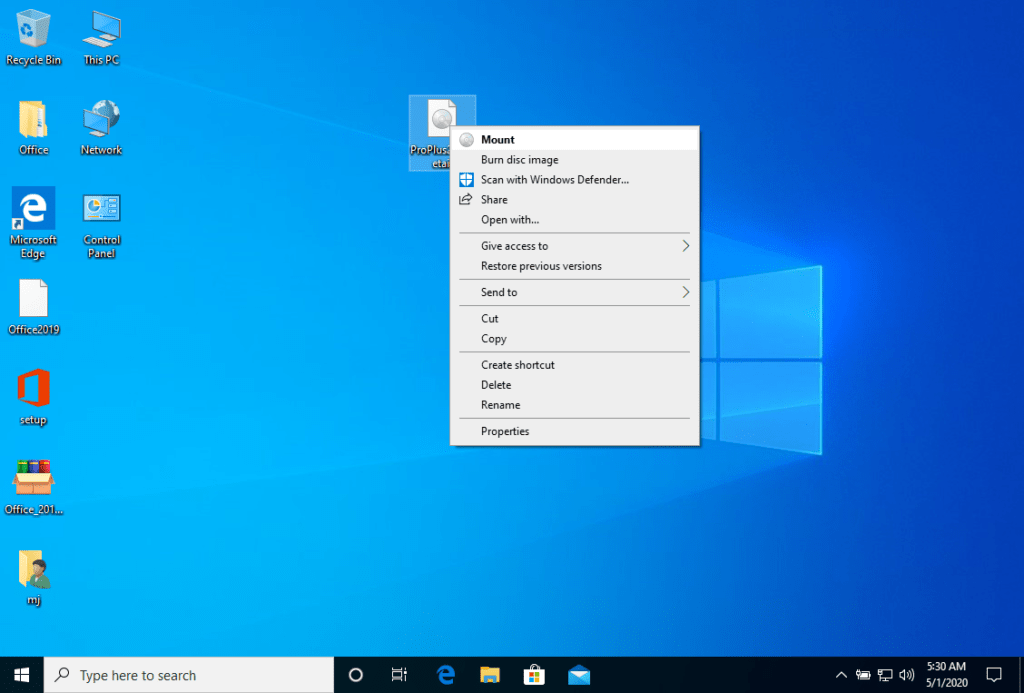
Once the download is complete, right click on the downloaded file and choose the “Mount” option from the dropdown menu.

Αφού προσαρτηθεί το αρχείο ISO που κατεβάσατε, μπορείτε να έχετε πρόσβαση σε αυτό από τον υπολογιστή σας ως μονάδα DVD. Εδώ μπορείτε να εκτελέσετε τον εγκαταστάτη.

Ολοκληρώστε την εγκατάσταση του προγράμματος και εισάγετε το “κλειδί ενεργοποίησης” κατά τη διάρκεια ή στο τέλος της διαδικασίας.

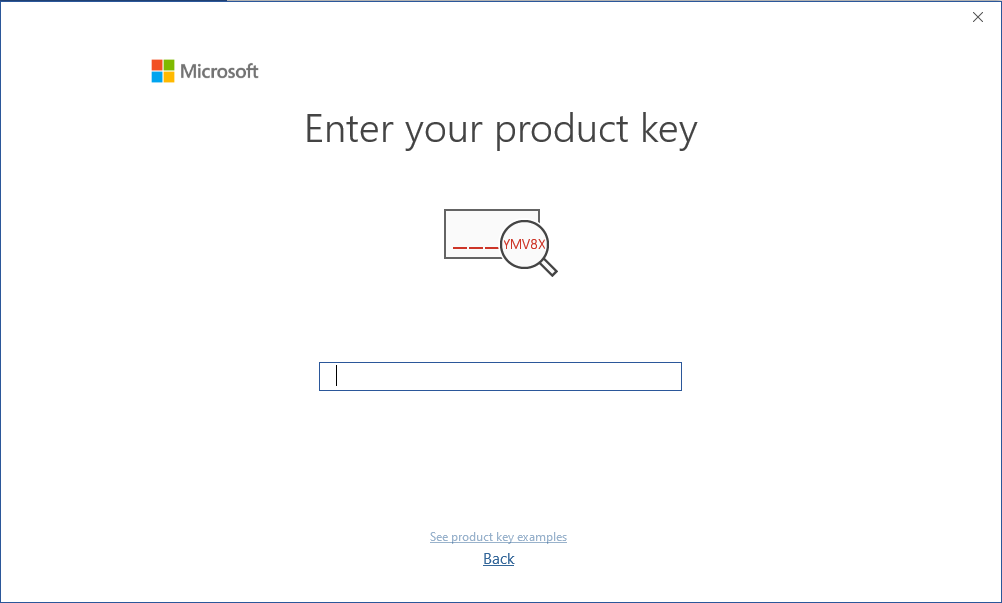
Once the download and the installation of the program is complete, enter the activation key when running any application from the Microsoft Office package, for example Microsoft Word. It usually will be the first thing that you will be asked for. Should that dialog not pop up you can enter the registration key in the “File” menu under “Account” (Microsoft Office 2013/2016/2019) or under “Help” (Microsoft Office 2010).


The mounted image should now appear on your Computer. If this does not appear (for example in Microsoft Windows 7) you have to use an alternative program to mount the product image, such as WinCDEmu which can be downloaded for free from the following link:

WinCDEmu

Use this program to create a virtual disk so that you can install your purchased program.

Η Microsoft έχει σταδιακά καταργήσει την υποστήριξη για ορισμένα παλαιότερα προϊόντα. Ως εκ τούτου, η ενεργοποίηση μέσω τηλεφώνου δεν είναι πλέον δυνατή. Εάν έχετε οποιαδήποτε προβλήματα ή ερωτήσεις κατά τη διάρκεια της εγκατάστασης, επικοινωνήστε με την υπηρεσία εξυπηρέτησης πελατών 24/7.

2/3/4/5 PC

Για ενεργοποιήσεις σε περισσότερες συσκευές, ακολουθήστε τα βήματα αυτού του οδηγού σε κάθε συσκευή που θέλετε να ενεργοποιήσετε το πρόγραμμα.
Σας ευχόμαστε μια επιτυχημένη εγκατάσταση. Εάν εξακολουθείτε να έχετε προβλήματα ή ερωτήσεις σχετικά με την εγκατάσταση, παρακαλούμε επικοινωνήστε με την εξυπηρέτηση πελατών μας ανά πάσα στιγμή. Θα σας βοηθήσουμε το συντομότερο δυνατό.
MS Microsoft Office 365 Pro Plus

Installation guide Microsoft Office 365 Professional Plus
1/2/3/4/5 PC - 32 & 64 Bits

  • 1,6 gigahertz (GHz) or faster 32-bit (x86) or 64-bit (x64) processor
  • 2 gigabyte (GB) RAM (32 bit) ή 4 GB RAM (64 bit)
  • 4 GB διαθέσιμου χώρου στο σκληρό δίσκο
  • Graphic device with resolution of 1024 × 768 pixels and DirectX 9 with driver WDDM 1.0 or higher
  • Microsoft Windows 10, Microsoft Windows 8.1, Microsoft Windows Server 2019 or Microsoft Windows Server 2016
  • Please note that this version of Microsoft Office is not compatible with older versions of Microsoft Windows or MacOS

The key you have purchased is a prepaid code that is not compatible with the pre-installed software. This is a genuine Microsoft product. Uninstall the previous version of Microsoft Office you have on your PC and restart your computer. This is important to avoid compatibility problems.

Download το πρόγραμμα με τον ακόλουθο σύνδεσμο λήψης:

ΓΛΩΣΣΑ32 AND 64 BITS
DEUTSCHHerunterladen
ENGLISHDownload
FRANÇAISTélécharger
ITALIANOScarica
ESPAÑOLDescarga

Αυτό το αρχείο ISO αποτελεί τη βάση για την εγκατάσταση του προϊόντος.

Συνιστάται να πλήρες την εγκατάσταση και την ενεργοποίηση του προϊόντος πριν συνδεθείτε με το λογαριασμό σας στη Microsoft.

Once the download is complete, right click on the downloaded file and choose the “Mount” option from the dropdown menu.

Αφού προσαρτηθεί το αρχείο ISO που κατεβάσατε, μπορείτε να έχετε πρόσβαση σε αυτό από τον υπολογιστή σας ως μονάδα DVD. Εδώ μπορείτε να εκτελέσετε τον εγκαταστάτη.

Ολοκληρώστε την εγκατάσταση του προγράμματος και εισάγετε το “κλειδί ενεργοποίησης” κατά τη διάρκεια ή στο τέλος της διαδικασίας.

Once the download and the installation of the program is complete, enter the activation key when running any application from the Microsoft Office package, for example Microsoft Word. It usually will be the first thing that you will be asked for. Should that dialog not pop up you can enter the registration key in the “File” menu under “Account” (Microsoft Office 2013/2016/2019) or under “Help” (Microsoft Office 2010).

The mounted image should now appear on your Computer. If this does not appear (for example in Microsoft Windows 7) you have to use an alternative program to mount the product image, such as WinCDEmu which can be downloaded for free from the following link:

WinCDEmu

Use this program to create a virtual disk so that you can install your purchased program.

Η Microsoft έχει σταδιακά καταργήσει την υποστήριξη για ορισμένα παλαιότερα προϊόντα. Ως εκ τούτου, η ενεργοποίηση μέσω τηλεφώνου δεν είναι πλέον δυνατή. Εάν έχετε οποιαδήποτε προβλήματα ή ερωτήσεις κατά τη διάρκεια της εγκατάστασης, επικοινωνήστε με την υπηρεσία εξυπηρέτησης πελατών 24/7.

2/3/4/5 PC

Για ενεργοποιήσεις σε περισσότερες συσκευές, ακολουθήστε τα βήματα αυτού του οδηγού σε κάθε συσκευή που θέλετε να ενεργοποιήσετε το πρόγραμμα.
Σας ευχόμαστε μια επιτυχημένη εγκατάσταση. Εάν εξακολουθείτε να έχετε προβλήματα ή ερωτήσεις σχετικά με την εγκατάσταση, παρακαλούμε επικοινωνήστε με την εξυπηρέτηση πελατών μας ανά πάσα στιγμή. Θα σας βοηθήσουμε το συντομότερο δυνατό.